Posts

Visualize Personal Data & Analytics

Image
Hello world! I'm writing this post after a very long time, a lot has happened and I have tons of findings to share with you all. Time to revive my writing skills by sharing here regularly about some highlights of my experiences with technology, so get ready for some regular updates.      Since my last post I changed a few roles, learnt couple of new BI tools, was promoted to lead and then to manage big teams and projects, got an opportunity to learn about Power Generation Operations and Oil & Gas practices.      I will be sharing a lot about each and every one of these experiences in my follow up posts. I want to share a Tech Talk I did for my company on use of Analytics on your personal data. Please watch it and leave your feedback.
Cognos Cross-tab Report Studio Report Ungroup Items to display as list on every line

I recently had a requirement where the user wanted data from an existing Crosstab report to repeat every line so he can use the output in excel for comparison/analysis. It must be an old trick for most of us as I see so many posts around but none of them are straight forward and are hard to follow so i thought why not log it here, besides its only been 10 months since I shared anything. Sorry guys I'm in support right now so no time to explore new tips and tricks or maybe i'm being lazy ;) By default Crosstab groups columns nested based on the position on the cross tab, the trick here is to identify your lowest and highest level of data granularity. Lets pick the below crosstab as an example with PRODUCT, DESCRIPTION, LOCATION as nested dimension columns and default measure of SALES $ across MONTHS.                   Measure: Sales $      MONTH 1 | MONTH 2 .................................... Product | Descripti...

Powerplay Studio Work Area disappears with blank screen

Recently one of the users pointed out a strange issue that data is not showing up in the Poweplay Studio work area(where you drag and drop cube items), user was able to see the dimension and measure folders on the left hand side. Initially i thought it has to do with a setting in users IE, so I suggested opening up the same in Firefox and it worked without issues. Deleting cookies,temp files, restoring default settings din't help either. After struggling  for 15-20 minutes and considerable amount of googling gave a wild answer...guess? It was ZOOM that caused this freaky effect in IE, at times I do this too. If you hold your CTRL key and use mouse scroll bar it shrinks or zooms any page, when it zooms somehow the Powerplay work Area disappears. 

Fit Lists/Crosstabs on one page HTML output in Report Studio

Image
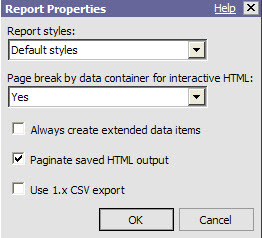
Came across this slick option that will help you fit multiple Crosstabs or Lists into one page in Report Studio and thought would share it here. In report studio go to: File > Report Properties > Page break by data container for interactive HTML : Yes If this doesn't work make sure you put the Crosstabs/Lists in table cells inside Block.

Restart Cognos Services from NT Scheduler and Email logs

Most of the company's that have multi server Cognos environments face challenges time to time on keeping environments up an running by minimizing outage times and crashes. From past couple of years I have implemented auto recycling/rebooting on windows NT Cognos servers for two main reasons: 1) Get rid of dump/garbage files due to report runs. 2) Ensures System stability if implemented weekly or monthly. With a little help from our NT guys we came up with a system reboot script which also emails a message, I scheduled this script as NT job sequentially(CM, BCM,DISP,DISP....) on all servers for a window of 1 hour every Saturday. This setup works really good except that one of the servers which is a dispatcher that always comes up at the end fails to initialize EVENT Service. So I was looking for ways to restart cognos service after system reboot and have the logs emailed automatically. Starting cognos services from a script is an easy task but to check if the services...

Cognos 8/10 CAMID-User ID/LDAP ID report

I came across this slick KB article on how to get the list of active sessions/users currently on any cognos environment and implemented it. https://www-304.ibm.com/support/docview.wss?uid=swg21385278 After I got this to work the servlet that runs only retrieves the CAMID and the session start time. I started looking around in the content store tables and was able to successfully  retrieve the CAMID and the associated  LDAP ID/User ID. I made this a query subject in the Audit model and joined it to the security groups table and created a report that will give me User ID, CAMID, AD Group, Name , Email. Query : SELECT  distinct ldap_id,     last_name,     first_name,     email,     objid as CAMID     FROM            (SELECT c33.cmid user_id, UPPER (c33.NAME) ldap_id,                   c1.surname last_name, c1.givenname first_...

Cognos Retrieve deleted/orphaned user's my folders from content store

Recently I had a challenging requirement to retrieve some users My Folders content whose active directory profiles were accidentally deleted and recreated. This requirement came to me after three days the profiles have been recreated, because there were profiles with new GUID in active directory which is nothing but CAMID in cognos they were not able to see any of their reports in cognos. First i started importing the content store deployment from 3 days ago(this had to be extracted with a point in time copy as it gets overwritten every night) to a sandbox and it ran for 5hrs and showing errors on some user profiles saying their CAMID is missing. After struggling for 10 hours I found this slick SDK script that gave some hope. Basically this SDK script on cognos KB queries the content store for Orphaned My Folders and saves them to a folder in Public Folders with CAMID's. We then had our DBA's restore the content store to the point where users had old CAMID's and I po...

Cognos Transformer Cube failure Alert Mechanism

Recently I had a requirement to create a automatic alert mechanism on cube build failure. As we all know this can be a project by it self if we set it up in a traditional way of write cube logs to tables and creating reports on top of the tables and setting up events to send out alerts on any failure. But with the help of a network admin I was able to setup alerts and it took some basic Vb coding too.. Below is the workflow of how the setup works and the basic requirements(this is for windows environment only): There are two VB scripts we need to setup and schedule via windows scheduler. First script writes the name of the Transformer log file into a .txt file. In my case the log file had a date that had to queried everyday before writing the log file name. ' Declare Variables for Oracle SQL   Dim OdbcDSN   Dim connect, connectionstr, sql, resultset      Dim fso      Set fso = CreateObject("Scripting.FileSystemObject")    ...

IIS 7 configuration for Cognos 8/10

Recently I was helping a friend to install Cognos 10 on his Windows 7 laptop, the install went smooth but to get the IIS running and have the Portal page come up it took more than 2 hours of googling and tweaks. So i figured it's wise to share this and even if one person can save time it's worth it. Configuring IIS 7 for cognos has changed a lot when compared to IIS 6, where you have straight forward settings to setup virtual directories and allow read/write/execute. In IIS 7 you need to do a bit more or may be it's just for windows 7, I haven't explored IIS 7 on Windows NT 2008. I have included the cognos support link that has the detailed steps in setting up IIS7. Before you follow the link you can enable or install IIS 7 in all Windows 7 professional systems under Control Panel > Programs > Turn Windows Components On or Off. Also make sure you enable ISAp and CGi extensions after IIS is installed from the same location under World Web Services(you can google t...

Analysis Studio Default Analysis report

Recently had a requirement where a blank Analysis Studio report needs to open when you open an existing report and click on new report icon. By default tool tries to put first two dimensions across and the first measure to form a cross tab, to overcome this you can utilize the 'Default Analysis' under Package > More> Modify the package configuration... >Default Analysis. The report that we setup here will be used as a default view and will open up when you choose default analysis or new icon with in Analysis Studio. There is an enhancement logged in with cognos to have Get Data Later option to be set as default.

Exploring New BI tools

Currently I'm exploring new BI tools after attending some demos from major vendors like SAP and Microsoft. Microsoft has a free BI excel plug in that's simple to learn and use but very powerful, it's called power pivot. You can download it from www.powerpivot.com - check it out. Microstrategy has similar architecture as Cognos so it's easy to learn it from Administration,Development and Design perspectives.

Prompts in Cognos Framework Manager

I use prompts in FWM time to time when the data is huge and I want to filter it right from table and also in manual SQL. Every time I use it I search for the syntax so i thought would share it here: Macro-   #prompt(‘pmtName’,’ datatype’)# Parameter Map-  #$parametermap{prompt(‘ pmtName’,’datatype’)}#  Session Parameter-   #$parametermap{$ Sessionparameter}# Date Prompt-  to_date(#prompt('Start/END Date', 'varchar')#,'yyyy-mm-dd') If you have multiple values to pass on to these prompts use  'in' as part of where clause. where Data_Item = (#prompt('Param_Name', 'varchar')#) 

Query Cognos 8/10 Content Store

I came across these queries that can give you good insight on the data and maintenance of Content Store in Cognos 8/10. You can also leverage the CMTools utility that comes with cognos install. ..\Cognos\bin\utilities\cm\CMTools\CMTools.exe select count(*) as "total number of objects" from CMOBJECTS; select c.NAME as "class name", count(*) as "number of objects" from CMOBJECTS o, CMCLASSES cgroup by o.CLASSID, c.CLASSID, C.NAME having c.CLASSID=o.CLASSID order by c.NAME ; select c.NAME as "class name", count(*) as "number of secured objects" from CMOBJECTS o, CMCLASSES c, CMPOLICIES pwhere o.CMID=p.CMID and p.POLICIES is not null group by o.CLASSID, c.CLASSID, C.NAME having c.CLASSID=o.CLASSID order by c.NAME ; select count(*) as "Total number of outputs", SUM(cast(coalesce(DATALENGTH(DATAPROP),0) as bigint)) as "Total size of outputs" from CMDATA where DATAPROP is not NULL; select ...

Cognos 8 Data Caching

Image
Just happen to come across this interesting feature in Cognos that I used a while ago in Reportnet which allows Data Caching for faster report runs. Cognos 8 supports user session based data caching for report prompts/LOV's and data, to use this feature you will have to edit the Governor settings in the Framework Manager model and check the 'Allow usage of local cache' box. On the Report Studio report you can use the 'Use Local Cache' property of a query to selectively enable caching. Note: If you are doing live reporting this feature must be turned off.

Cognos Compatibility

This link gives all the details on different versions of Cognos and it's compatible softwares. https://www-304.ibm.com/support/docview.wss?uid=swg27014432

Changing /temp.. file location under Cognos Configuration

I was trying to change the temp file location to an allocated shared drive on Cognos servers but there is an issue with one of the servers not being able to start application services in tomcat while starting services.I'm working with cognos support on this, but what i don't understand is how can an other server work and not this. All servers have separate folders under the share and write access to the cognos account, the only difference is this network share was allocated for the server that works without an issue, but I did share the folder on the temp drive and then created sub folders for each server and made sure Cognos account has write access. Hopefully I'll get an answer soon :).

Network Shared drive setup to save report outputs in Cognos 8

Image
Cognos can be configured to allow users to save report outputs on an network drive as opposed to content store. This feature comes in handy when you have lot of business users using a central file at a network location and also you can setup FTP jobs to send these output files across networks. I have listed the steps on how to configure it: 1) On your Content Manager install edit the 'Archive Location File System Root' to the network location.     Cognos Configuration>Actions>Edit Global Configuration..>General> 2) Make sure the user account that Cognos services are running under have write permissions on this share. 3) Now this file share location has to be configures in Cognos Administration portal.    Configuration> Dispatchers and Services > Click on Define File System location(Highlighted in yellow) 4) Click New    5) You can setup multiple location based on folders within the share and how you want to set up security. ...

Rank in Cognos 8 development

We all know how to use the rank( ) function in cognos, it basically ranks the measure across a dimesion by weight. The basic syntax is rank([Data_Item] ASC/DESC) which will give a result set, but most of the times we need to just show top X or bottom X. For this requirement we can use A--> running-count (rank([Data_Item] ASC/DESC)) and then add a filter like A<=X to get top X, but there is a catch here what if there are multiple rows that have the same rank and you still want to show them. In this case use A--> running-count (rank(distinct([Data_Item] ASC/DESC))) and then a filter A<=X. To get the bottom X try this: A >= (maximum (running-count (rank(distinct([Data_Item] ASC/DESC)))) - X) There are multiple ways to achive this requirement, i saw couple of other interesting ways on the net but I used this and found simple enough to share.

CPU Monitoring on Cognos Servers

There a tons of freeware apps available that you can use to monitor CPU usage on Cognos servers and this really helps when you have a distributed environment as you can monitor the CPU on each of these servers right from you desktop/laptop without having to RDP. I use the Performance Monitoring service available in Windows Server OS . I found this link with a good explanation on how it works. http://www.computerperformance.co.uk/HealthCheck/Processor_Health.htm You can set this up from your local machine(XP) using perfmon tool. From windows RUN type perfmon that will bring up the Performance Monitoring window where you can add counters of the servers, if it throws an error that's because of security or counters not enabled on the machine you are trying to add, your NT guys should be able to fix it.

Parameterized URL in Cognos 8

I find this feature in Cognos 8 slick as this not only lets you manipulate the prompts and output format from URL but also helps you to integrate reports into other legacy/corporate portals/share point sites. The best feature I like is how you can selective choose different headers to be displayed and pass Parameters. http://www.ibm.com/developerworks/data/library/cognos/page123.html